> ## Documentation Index
> Fetch the complete documentation index at: https://developers.getswipe.in/llms.txt
> Use this file to discover all available pages before exploring further.
# Document
> Create, edit, cancel and get document PDFs
Our comprehensive API solution allows you to manage essential business documents such as invoices, subscriptions, pro forma invoices, sales returns, and purchase returns. With our APIs, you can effortlessly create, manage, and retrieve documents, including E-invoices and export invoices, ensuring streamlined and efficient operations.
## What We Offer
All the features mentioned below, and more, can be accessed directly using
the [Swipe Portal](https://app.getswipe.in).
1. [Document Creation](https://developers.getswipe.in/api-reference/document-v2/create-a-document): Easily generate professional invoices, pro forma invoices, sales returns, and purchase returns tailored to your business needs.
### Steps to create a document:
1. Checkout the create document endpoint in the API playground and use your API key to test the endpoint.
2. If your API key is valid, this API endpoint returns a 200 response with document details in a specified JSON format.
#### Things to keep in mind:
1. You can send your product\_id and customer\_id to create a document. These will be internally mapped to the product and customer details in Swipe.
2. If the Product or Party is not found, they will be created automatically with the details provided.
3. If new details for Party are provided, they will be updated in the system which will be reflected in your existing documents as well.
Try Creating a document
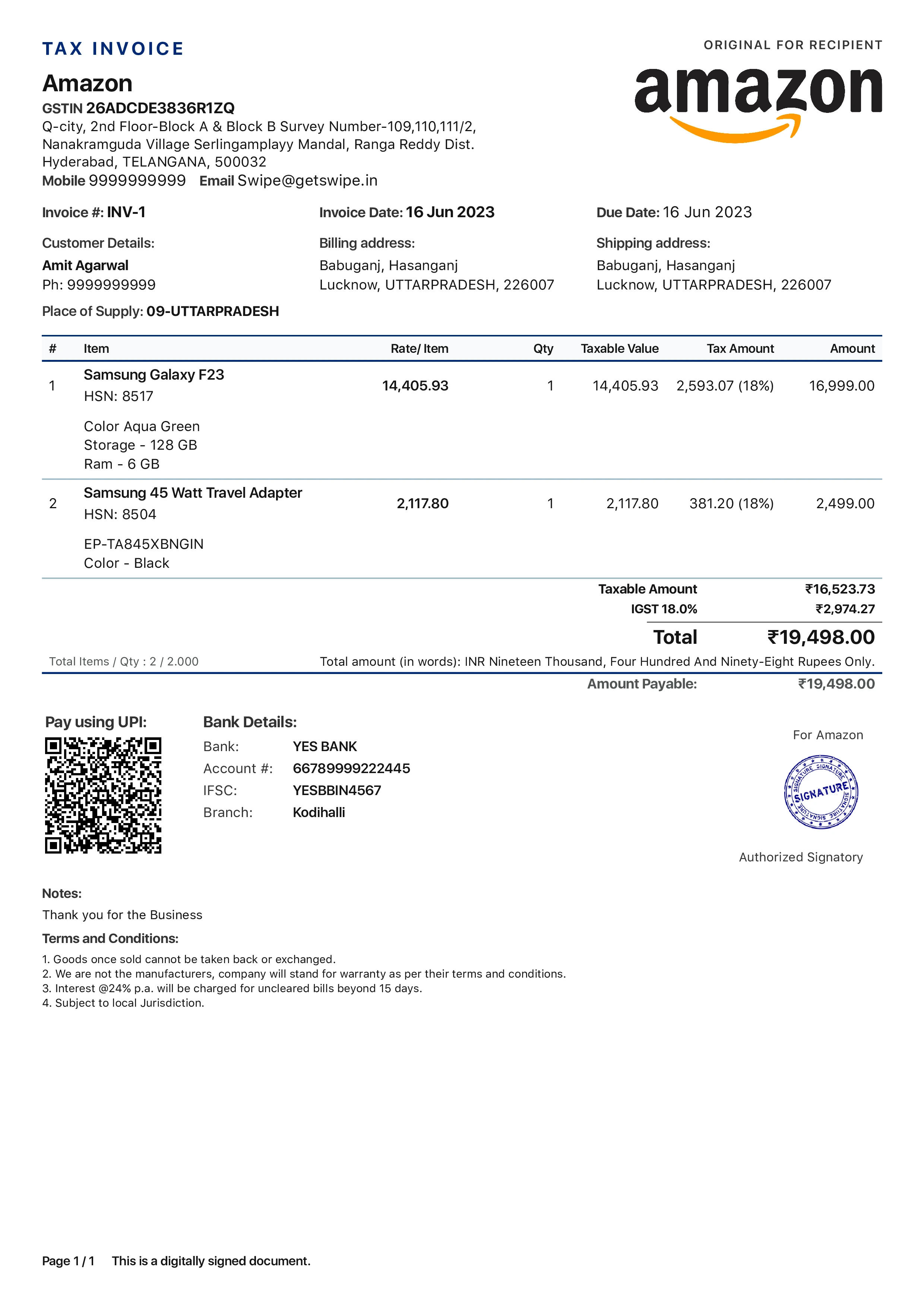
2. [Fetch PDF](https://developers.getswipe.in/api-reference/document-v2/get-document-pdf): Access PDFs of already created documents.
### Steps to get document PDFs:
1. Checkout the get document PDF endpoint in the API playground. For `doc_hash_id`, use the `hash_id` received from creating the document.
2. If your API key is valid, this API endpoint returns a 200 response along with the PDF.
Fetch PDFs of documents that are already created
### Snapshot of a document PDF
 3. [Get Document](https://developers.getswipe.in/api-reference/document-v2/get-a-document): Access specific product information quickly for operational needs or customer queries.
### Steps to get particular document details:
1. Checkout the get document endpoint in the API playground. For `doc_hash_id`, use the `hash_id` received from creating the document.
2. If your API key is valid, this API endpoint returns a 200 response with document details in a specified JSON format.
Try fetching document details
4. [Document Cancellation](https://developers.getswipe.in/api-reference/document-v2/cancel-a-document): Easily cancel your documents.
### Steps to cancel a document:
1. Checkout the cancel document endpoint in the API playground. For `doc_hash_id`, use the `hash_id` received from creating the document.
2. If your API key is valid, this API endpoint returns a 200 response with document details in a specified JSON format.
Try Cancelling an active document
5. [List of Documents](https://developers.getswipe.in/api-reference/document-v2/list-of-documents): Retrieve a complete list of all documents in your system based on the payment status, enabling seamless tracking and management.
### Steps to get list of documents created:
1. Checkout the list document endpoint in the API playground.
2. If your API key is valid, this API endpoint returns a 200 response with a list of all the documents with basic details in JSON format.
Fetch List of all documents
You can keep track of all documents on [Swipe
Dashboard](https://app.getswipe.in/list/sales)
6. [Edit Document](https://developers.getswipe.in/api-reference/document-v2/edit-a-document): Seamlessly edit and update your documents to ensure accuracy and consistency.
### Steps to create a document:
1. Checkout the edit document endpoint in the API playground and use your API key to test the endpoint.
2. If your API key is valid, this API endpoint returns a 200 response with updated document details in a specified JSON format.
#### Things to keep in mind:
1. In the request URL, provide the unique `doc_hash_id` of the document that needs to be updated.
2. In the request body, include all the keys with their respective updated values.
Try Editing a document
3. [Get Document](https://developers.getswipe.in/api-reference/document-v2/get-a-document): Access specific product information quickly for operational needs or customer queries.
### Steps to get particular document details:
1. Checkout the get document endpoint in the API playground. For `doc_hash_id`, use the `hash_id` received from creating the document.
2. If your API key is valid, this API endpoint returns a 200 response with document details in a specified JSON format.
Try fetching document details
4. [Document Cancellation](https://developers.getswipe.in/api-reference/document-v2/cancel-a-document): Easily cancel your documents.
### Steps to cancel a document:
1. Checkout the cancel document endpoint in the API playground. For `doc_hash_id`, use the `hash_id` received from creating the document.
2. If your API key is valid, this API endpoint returns a 200 response with document details in a specified JSON format.
Try Cancelling an active document
5. [List of Documents](https://developers.getswipe.in/api-reference/document-v2/list-of-documents): Retrieve a complete list of all documents in your system based on the payment status, enabling seamless tracking and management.
### Steps to get list of documents created:
1. Checkout the list document endpoint in the API playground.
2. If your API key is valid, this API endpoint returns a 200 response with a list of all the documents with basic details in JSON format.
Fetch List of all documents
You can keep track of all documents on [Swipe
Dashboard](https://app.getswipe.in/list/sales)
6. [Edit Document](https://developers.getswipe.in/api-reference/document-v2/edit-a-document): Seamlessly edit and update your documents to ensure accuracy and consistency.
### Steps to create a document:
1. Checkout the edit document endpoint in the API playground and use your API key to test the endpoint.
2. If your API key is valid, this API endpoint returns a 200 response with updated document details in a specified JSON format.
#### Things to keep in mind:
1. In the request URL, provide the unique `doc_hash_id` of the document that needs to be updated.
2. In the request body, include all the keys with their respective updated values.
Try Editing a document